In online stores, managing the weight of customer orders is crucial for several reasons, from controlling shipping costs to ensuring that products are delivered safely. Without a maximum order weight restriction, customers could potentially place orders that are too heavy for standard shipping methods, leading to fulfillment issues and increased costs. The Maximum Order Weight Restriction rule addresses this problem by limiting the total weight of an order during checkout.
Why Maximum Order Weight Matters
Setting a maximum weight limit for orders is essential for multiple reasons:
Shipping and Handling: Many shipping carriers impose weight restrictions. Without this check, orders could exceed the shipping company's weight limit, causing delays or additional fees.
Cost Control: Extremely heavy orders may incur high shipping costs. By restricting the weight, businesses can keep shipping costs predictable and within budget.
By enforcing a maximum order weight, businesses can avoid logistical issues, ensure smoother shipping processes, and prevent unexpected cost spikes.
How Maximum Order Weight Restriction Works
The Maximum Order Weight Restriction rule is designed to automatically detect when an order exceeds the specified weight limit. Here’s how it functions:
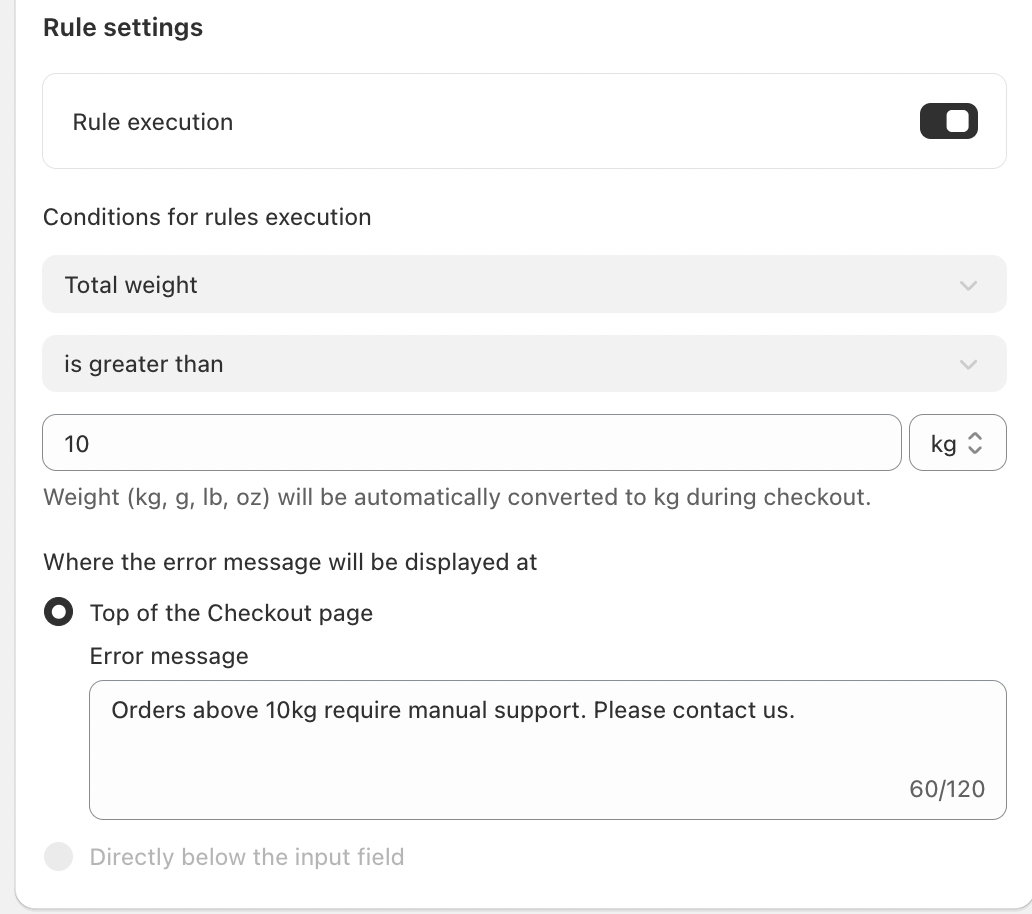
Weight Limit Set-Up: You define a weight threshold (e.g., 10 kg), and the system will automatically check the total weight of the order during checkout.
Validation: If the total weight exceeds the set limit, the rule triggers an error message that informs the customer that their order exceeds the weight limit and they need to adjust the order weight to fall below the set threshold.
Automated Conversion: The system automatically converts all weight measurements (kg, g, lb, oz) into kilograms to ensure uniformity.
The rule works in the background, seamlessly validating each order as customers attempt to check out, ensuring smooth order processing.
Key Features
Universal Rule Execution: The Maximum Order Weight Restriction rule is applied to all orders automatically during checkout, ensuring consistent enforcement without requiring any extra action from the customer or staff.
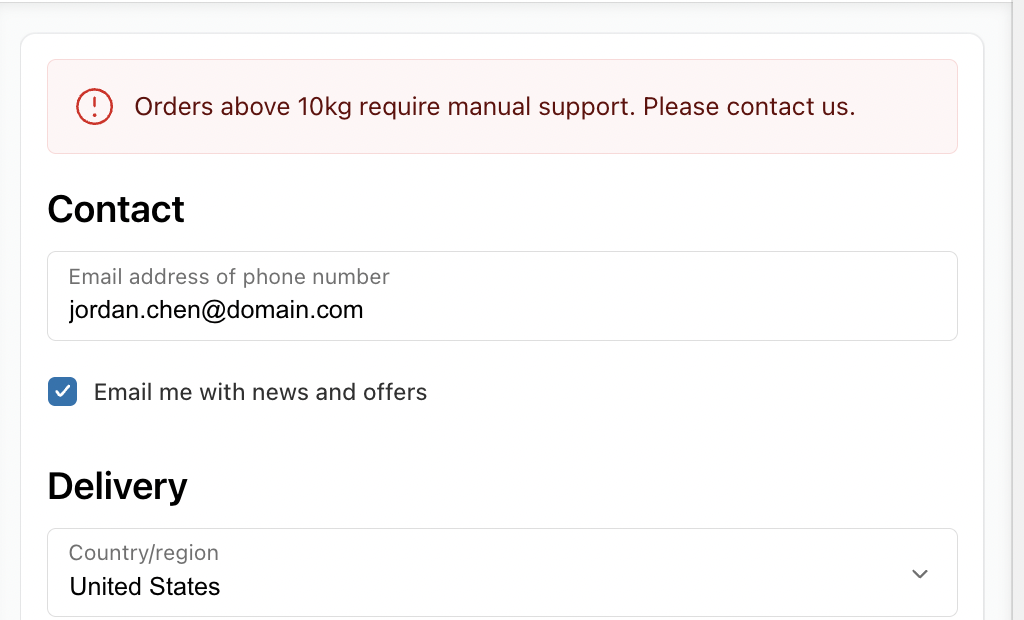
Inline Error Messaging: When an order exceeds the weight limit, an error message is displayed at the top of the checkout page, giving immediate feedback to the customer. This minimizes confusion and enables quick correction.
Customizable Error Messaging: The error message can be customized to reflect your brand’s tone. For instance, you might use a message like:
“Orders above 10 kg require manual support. Please contact us.” This message can be adjusted to match your store’s communication style, ensuring clarity without sounding too harsh.
Conclusion
The Maximum Order Weight Restriction rule is a valuable tool for businesses looking to maintain smooth operations and control shipping costs. By limiting the weight of orders at checkout, businesses can prevent issues related to shipping, fulfillment, and operational inefficiencies. This simple validation process enhances order accuracy, reduces fraud, and ensures a seamless experience for both businesses and customers.
If you have any questions or need further assistance, feel free to reach out to support@valider.app
Was this article helpful?
That’s Great!
Thank you for your feedback
Sorry! We couldn't be helpful
Thank you for your feedback
Feedback sent
We appreciate your effort and will try to fix the article