To help merchants manage and locate rules more efficiently, Valider provides built-in filtering options. These filters allow you to quickly narrow down rules based on their purpose or current state.
Filter by Category
The Category filter allows you to group and view rules based on their functional area. This is especially useful when your store has multiple validation and customization rules enabled.
Available categories include:
Address Validation – Rules related to shipping address accuracy and eligibility
Cart Validation – Rules that validate cart contents or conditions
Customer Validation – Rules based on customer details
Fulfillment Location Validation – Rules tied to fulfillment locations
Payment Customization – Rules that affect available payment methods
Shipping Customization – Rules that modify or restrict shipping options
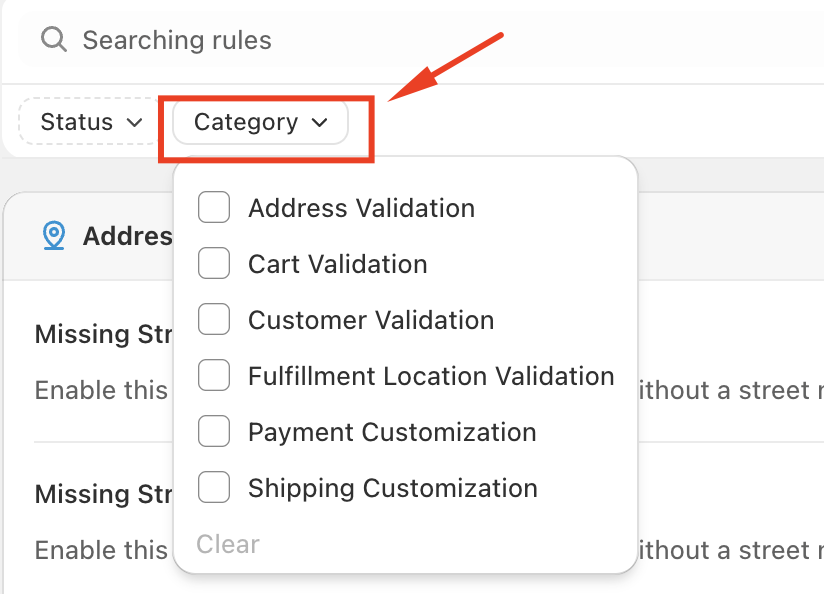
By selecting one or more categories, only the rules that match your selection will be displayed.
Filter by Status
The Status filter allows you to view rules based on whether they are currently active.
Available status options include:
Published – Rules that are active and applied during checkout
Unpublished – Rules that are inactive and not applied
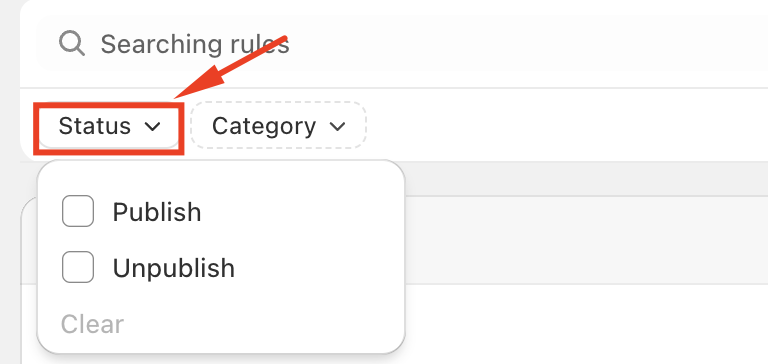
This filter is helpful for reviewing inactive rules, troubleshooting behavior, or confirming which rules are currently enforced.
Combined Filtering
You can use Category and Status filters together to further refine your results. For example, you may choose to view only Published Address Validation rules to quickly audit active address restrictions.
Clearing Filters
At any time, you can use the Clear option within the filter dropdown to remove applied filters and return to the full rules list.
These filtering tools make it easier to manage rules at scale, ensuring better visibility and control over how validation and customization rules are applied in your store.
Should you have any further questions, please feel free to drop an email to support@valider.app
Was this article helpful?
That’s Great!
Thank you for your feedback
Sorry! We couldn't be helpful
Thank you for your feedback
Feedback sent
We appreciate your effort and will try to fix the article