Accurate and standardized address data is essential for successful order fulfillment. While emojis are increasingly common in everyday digital communication, their use in address fields can cause validation failures, processing errors, and delivery disruptions. To prevent these issues, Emoji Restriction Validation ensures that emojis are not entered into address fields during checkout.
Why Emojis in Addresses Cause Problems
Shipping carriers and address validation systems rely on structured, text-based data. Emojis are not recognized by most carrier databases and can interfere with address parsing and verification. When emojis appear in address fields, they may lead to:
Address validation failures
Rejected or delayed shipments
Manual intervention by support or operations teams
Increased carrier exceptions and costs
Frustrated customers due to checkout errors or delivery issues
Preventing emojis at the point of entry helps maintain clean, carrier-compliant address data.
How Emoji Restriction Validation Works
When enabled, the Emoji Restriction rule automatically scans address input fields during checkout. If an emoji is detected, the system immediately blocks submission and prompts the customer to remove it before proceeding.

This validation is powered by Valider’s global address verification infrastructure, which works in collaboration with trusted logistics partners such as USPS, FedEx, DHL, and other carriers. The result is consistent, real-time enforcement of address formatting standards across regions.
Key Features
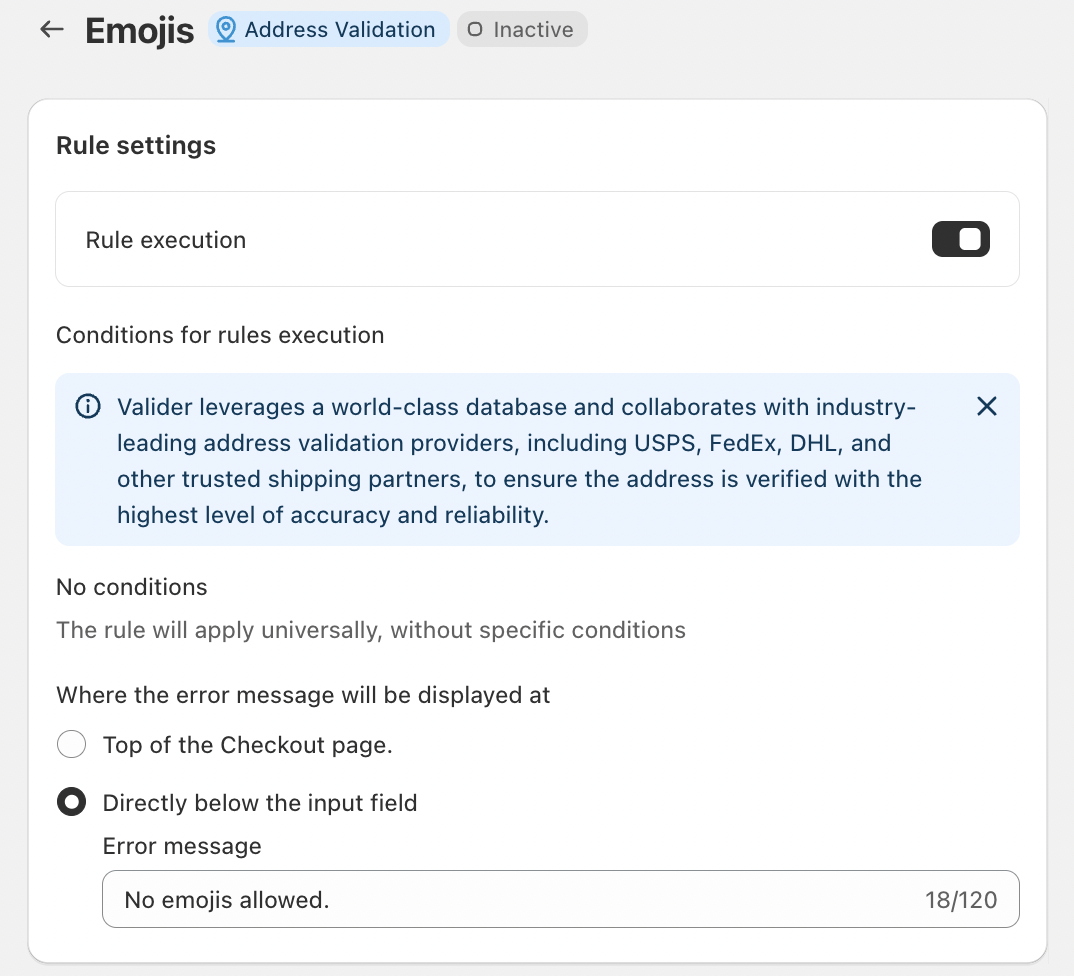
Universal Rule Execution
The rule applies universally across all checkouts without requiring specific conditions. Once activated, it ensures emoji-free address input by default.
Inline Error Messaging
Error messages can be displayed directly below the affected input field, guiding customers to correct the issue exactly where it occurs. This reduces friction and speeds up checkout completion.
Custom Error Messaging
Businesses can tailor the error message to match their brand voice. For example:
“No emojis allowed.”
Clear, concise messaging helps customers understand and fix the issue quickly.
Conclusion
Emoji Restriction Validation may seem like a small detail, but it plays an important role in maintaining address accuracy and preventing avoidable shipping errors. By stopping emojis at checkout, businesses can reduce carrier issues, streamline operations, and deliver a smoother, more reliable customer experience—before the order is ever shipped.
Should you have any further questions, please feel free to drop an email to support@valider.app.
Was this article helpful?
That’s Great!
Thank you for your feedback
Sorry! We couldn't be helpful
Thank you for your feedback
Feedback sent
We appreciate your effort and will try to fix the article