Accurate address validation plays a critical role in ensuring smooth and reliable order fulfillment. Private mailbox (PMB) addresses—commonly associated with locations such as UPS Store mailboxes or other commercial mail-receiving agencies—are not always supported by all carriers or shipping methods. If your business cannot ship to these address types, allowing them at checkout can lead to delivery failures and unnecessary operational overhead.
The Private Mailbox Address Validation rule helps prevent these issues by identifying and blocking private mailbox addresses before an order is placed.
Why Private Mailbox Addresses Matter
Private mailbox addresses differ from residential and standard business addresses. Many carriers, freight services, and delivery methods have restrictions when shipping to PMBs, particularly for oversized items, signature-required deliveries, or restricted goods.
If unsupported private mailbox addresses are accepted at checkout, businesses may face:
Failed or rejected deliveries
Returned shipments and reshipping costs
Manual intervention from support teams
Delays that negatively impact customer satisfaction
Preventing these addresses upfront ensures orders can be fulfilled without disruption.
How Private Mailbox Address Validation Works
When enabled, the Private Mailbox rule automatically checks shipping addresses entered during checkout. If the system detects a private mailbox address, it immediately blocks checkout progression and displays an error message informing the customer that delivery to private mailboxes is not supported.
This validation leverages a world-class address database and works in collaboration with trusted address verification and logistics partners such as USPS, FedEx, DHL, and other shipping providers to ensure accurate and reliable detection.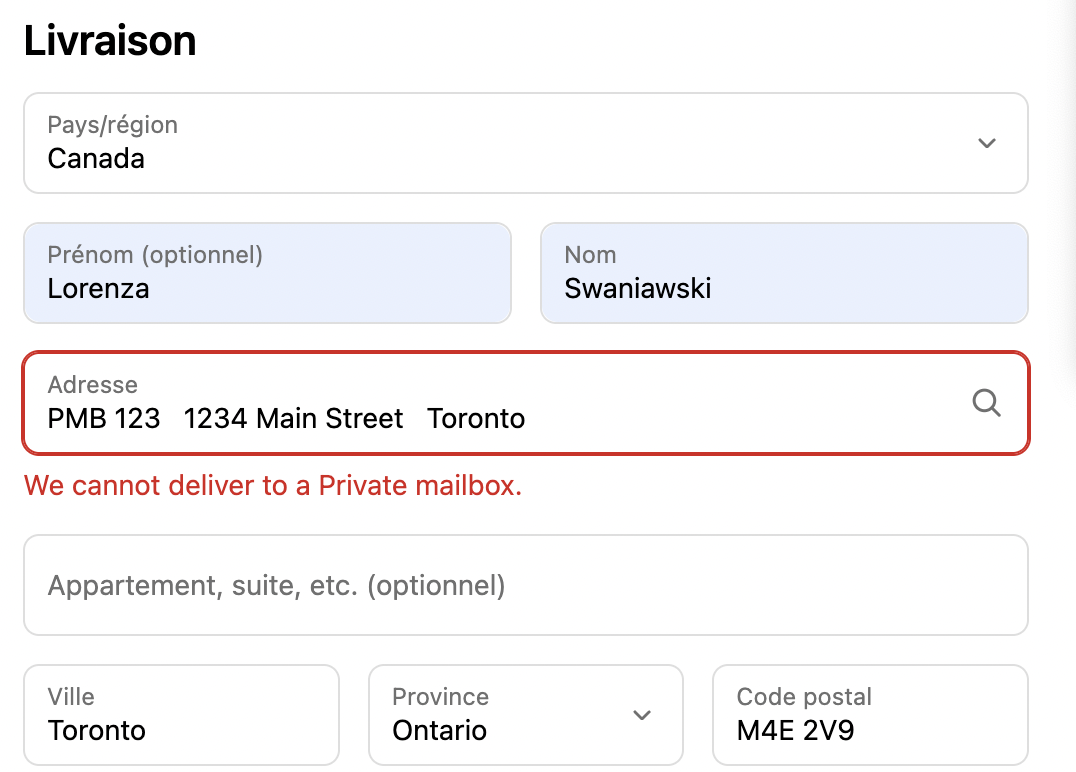
Key Features
Universal Rule Execution
The rule applies universally across all checkouts, with no additional conditions required. Once enabled, private mailbox addresses are consistently identified and restricted.
Inline Error Messaging
Error messages can be displayed directly below the address input field or top of the Checkout page, making it immediately clear where the issue is and allowing customers to correct their address quickly.
Custom Error Messaging
Businesses can tailor the error message to match their brand voice. For example:
“We cannot deliver to a Private mailbox.”
Clear and direct messaging helps reduce confusion and support inquiries.

Conclusion
Shipping constraints are best handled before an order is completed. By enabling Private Mailbox Address Validation, businesses can proactively prevent undeliverable orders, reduce fulfillment costs, and provide a more reliable checkout experience.
This simple yet effective rule improves operational efficiency, protects carrier relationships, and sets clear expectations for customers—ensuring every order is ready to ship successfully from the start.
Should you have any further questions, please feel free to drop an email to support@valider.app
Was this article helpful?
That’s Great!
Thank you for your feedback
Sorry! We couldn't be helpful
Thank you for your feedback
Feedback sent
We appreciate your effort and will try to fix the article