Introduction
Shipping restrictions are an essential part of any eCommerce business, especially when certain locations or delivery options are not available. One of those restrictions involves DHL Packstation addresses, a popular delivery service in Germany and Austria. For some online retailers, shipping to these Packstations might not be feasible. Here’s a guide to help you implement the necessary shipping rules to prevent orders from being sent to DHL Packstations in these two countries.
What Are DHL Packstations?
DHL Packstations are automated lockers where people in Germany and Austria can pick up their parcels, making the delivery process more convenient. However, not all businesses can deliver to these locations due to logistical reasons. That’s why you may need to block customers from selecting a DHL Packstation as their shipping address during checkout.
Why Should You Block DHL Packstation Addresses?
If your business doesn’t support DHL Packstation deliveries, or if you want to avoid the complexity of these delivery points, blocking them at the checkout stage helps:
Prevent Delivery Issues: Avoid sending orders to locations that you can't fulfill.
Enhance Customer Experience: Clearly inform customers about shipping restrictions before they make a purchase.
Streamline Order Processing: Reduce the chances of order cancellations or returns due to incorrect shipping addresses.
How to Implement the Rule
Set the Shipping Country Condition:
Make sure the rule is only triggered for Germany and Austria. The shipping country must be either one of these for the rule to apply.
Check the Address for “Packstation” and Valid Postal Code:
The rule should validate if the address contains the term “Packstation”.
Also, check if the Postnummer (postal code) follows the proper format (6-10 digits). If both conditions are met, it’s likely a Packstation address.
Display the Error Message:
Once a customer tries to proceed with a Packstation address, an error message should appear. This will inform them that delivery to Packstations is not possible.
Suggested error message: "We cannot deliver to a DHL Packstation."
Where the Message Appears:
This error should be displayed at the top of the checkout page to ensure customers see it right away.
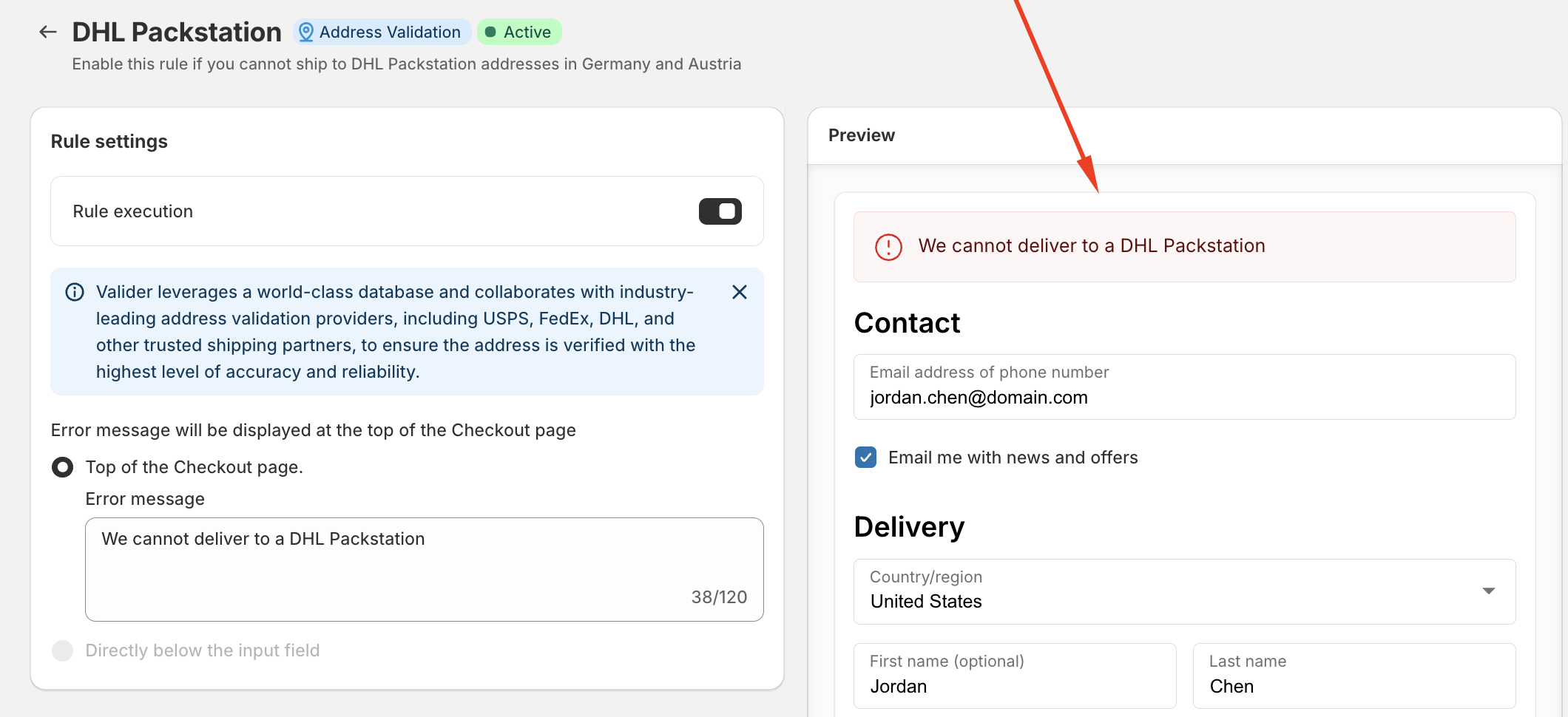
Technical Overview of the Validation Process
The address validation system works by verifying each part of the shipping address using a trusted database. It checks:
Address Fields: The system will look through Address Line 1, Address Line 2, and Company fields to see if the term “Packstation” appears.
Postal Code: It will also ensure that the postal code (Postnummer) follows the correct format, which is usually 6-10 digits.
Flagging Invalid Addresses: If the address contains a Packstation-related term, the system flags it and prevents the checkout from going through.
What Happens Next?
Once the error is triggered, the checkout process is paused, and customers will be required to provide a valid shipping address that does not include a DHL Packstation. This helps ensure that all deliveries are shipped to a valid address that your shipping partners can deliver to.
Conclusion
Blocking DHL Packstation addresses in Germany and Austria is an essential step if your business cannot support these delivery locations. By setting up the right rules on your eCommerce platform, you can prevent customers from selecting invalid addresses and avoid shipping issues. It’s a simple yet effective way to enhance your shipping process and provide a better customer experience.
Was this article helpful?
That’s Great!
Thank you for your feedback
Sorry! We couldn't be helpful
Thank you for your feedback
Feedback sent
We appreciate your effort and will try to fix the article