In online stores, ensuring accurate and truthful customer information is essential not just for order fulfillment but also for preventing fraudulent activities. Fake names, such as "test," "dummy," or random characters, can easily be entered by users trying to bypass proper checkout procedures. To address this, the Fake Last Name Check rule ensures that customers enter a valid last name, preventing issues with fake or placeholder names.
Why Fake Last Names Matter
Fake or placeholder names can cause several problems for businesses, including:
Order fulfillment issues: Shipping and customer service become difficult when the last name doesn't match real customer data.
Fraud prevention: Fake names may be used to create fraudulent or suspicious accounts.
By enforcing a check on fake last names, businesses can maintain data integrity, reduce fraud, and ensure smoother order fulfillment.
How Fake Last Name Check Works
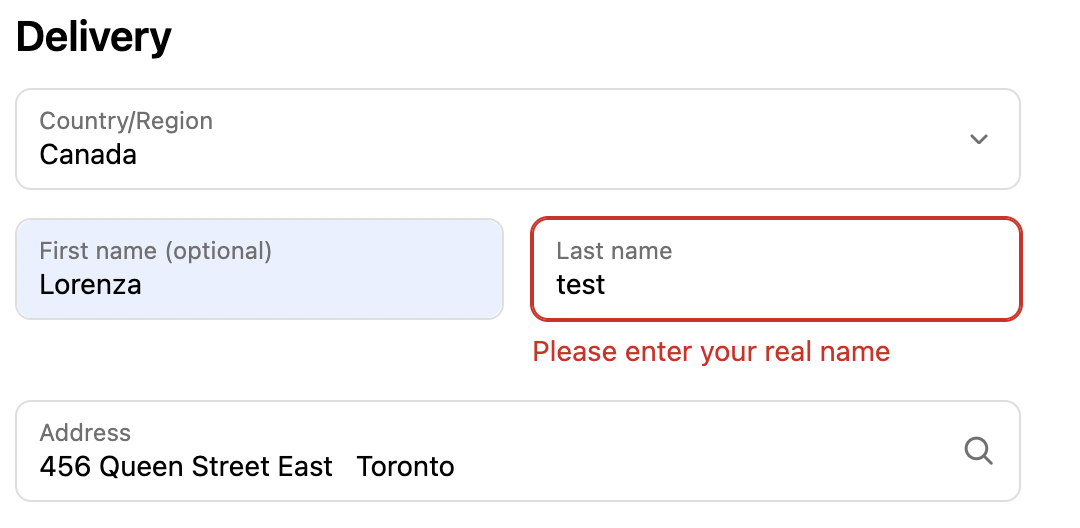
The Fake Last Name Check rule automatically scans the last name entered during checkout. If the entered last name contains a predefined set of suspicious words, like “test,” “dummy,” or other similar placeholders, the system will trigger an error message, prompting the user to enter a valid, real name.
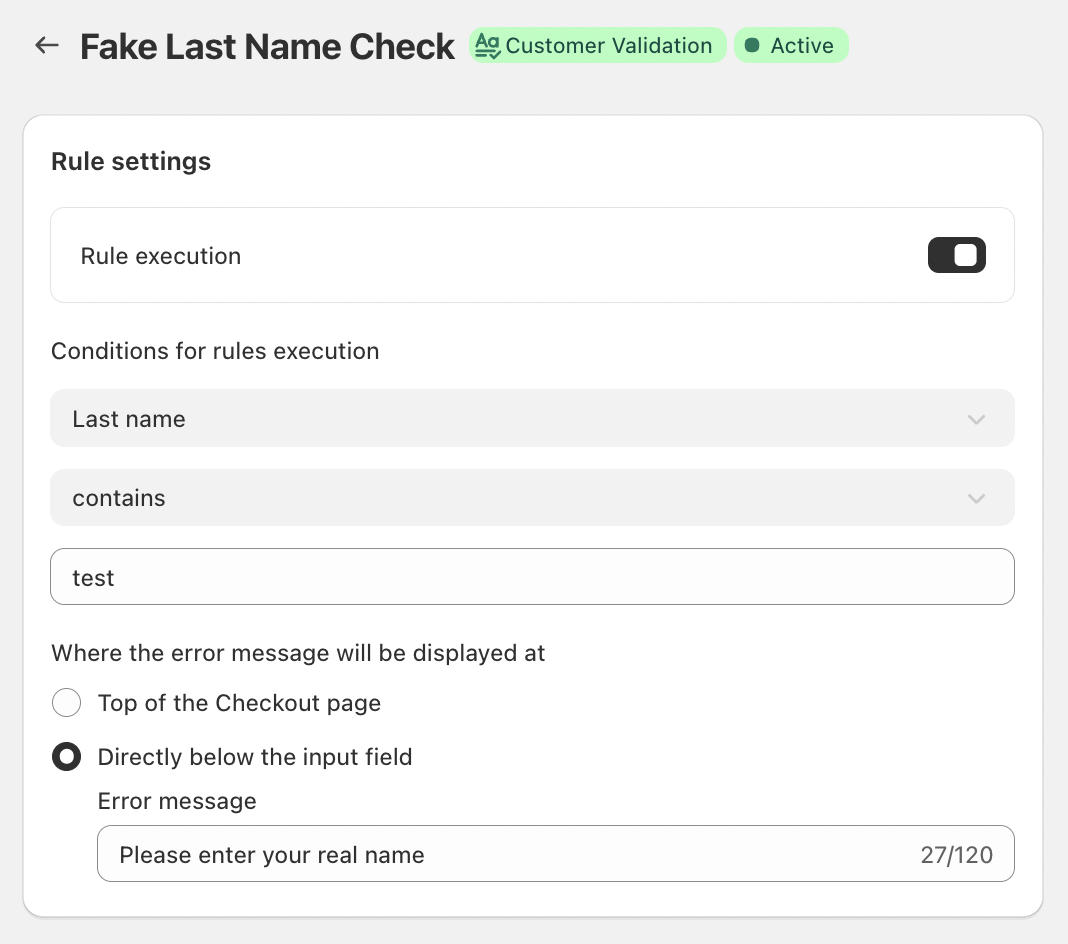
In this case, the system is specifically set to detect "test" as part of the last name and prevent customers from using it as a placeholder. The validation process is automated and works in real time, preventing customers from proceeding with an invalid last name.
Key Features
Universal Rule Execution
The Fake Last Name Check rule applies automatically during checkout, making it effortless to enforce across all transactions. No additional conditions are required, and it works in the background to ensure only valid customer data is accepted.
Inline Error Messaging
If a fake last name is detected, an error message is displayed top of the Checkout page or directly below the last name input field. This immediate feedback makes it clear to the customer what the issue is and helps them correct it right away, preventing frustration and delays in the checkout process.
Customizable Error Messaging
The error message shown to the customer can be tailored to align with the business’s tone and style. For example, the message could read:
“Please enter your real name.”
This message provides clarity and encourages users to correct the information without sounding too harsh or impersonal.
Conclusion
The Fake Last Name Check is an essential tool for businesses looking to maintain data integrity and prevent fraud. By ensuring that customers enter valid last names during the checkout process, businesses can avoid problems related to incorrect or fake information that can affect shipping, customer support, and account security.
This simple validation process helps improve order accuracy, prevents fraud, and ensures a smoother experience for both businesses and customers alike. It's an effective way to maintain trust and integrity in your e-commerce platform.
If you have any questions or need further assistance, feel free to reach out to support@valider.app
Was this article helpful?
That’s Great!
Thank you for your feedback
Sorry! We couldn't be helpful
Thank you for your feedback
Feedback sent
We appreciate your effort and will try to fix the article